Software simulations
Recourse vs Articulate Storyline for software simulations
You keep Storyline for the sims. Every rollout you re-record in Storyline's recorder, fix the hotspots, publish a SCORM, upload it, and then the screen changes and you do it again. Recourse does what Storyline's screen recorder does, the watch, try and test versions of a task, but it starts from any recording you already have or a click-through in Chrome, takes minutes, and keeps the package in your LMS current when the screen changes.
Updated
Facts checked on 29 October 2026 against each vendor's own pages.
Choose Storyline if your job is building custom interactive courses, with triggers, variables and branching on a canvas, and the software simulations are a small part of that work. Choose Recourse if your job is keeping software training current through rollouts: the task already exists as a recording or a click-through, the screens keep changing, and you need the practice and the scored check in your LMS without re-recording every time.
Where each tool starts
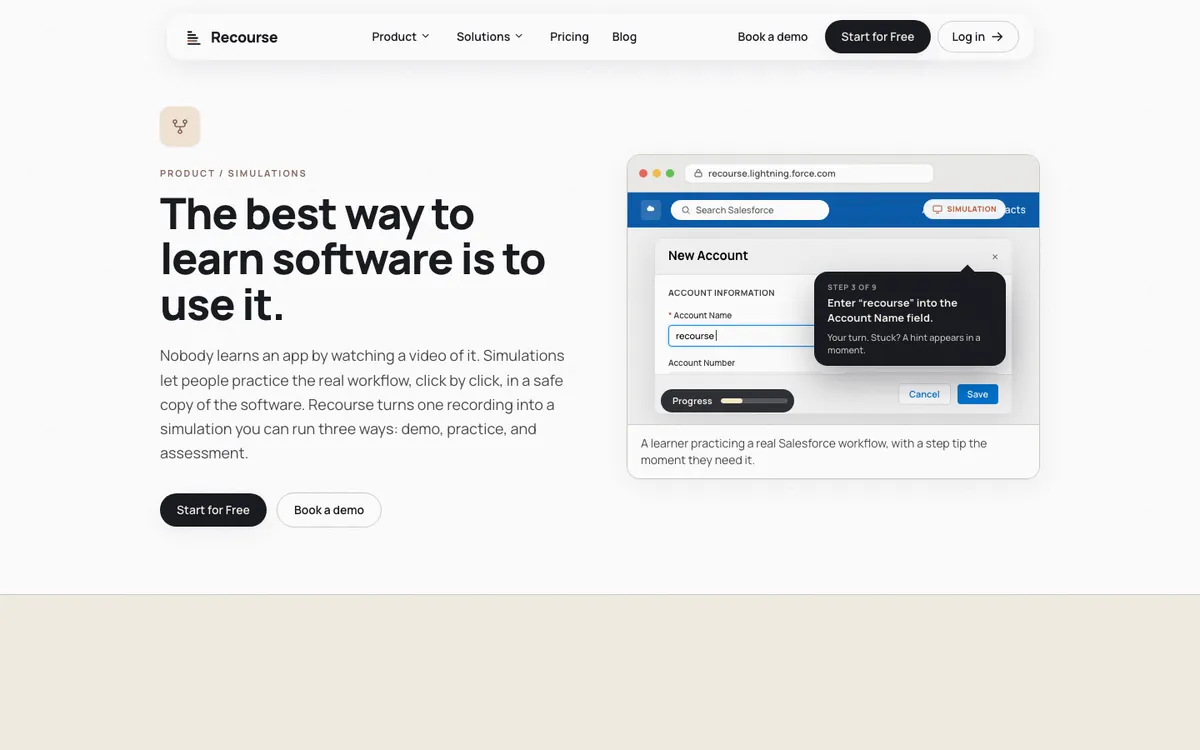
Storyline 360 starts from its own screen recorder. You open Record Screen inside Storyline, set the recording size, pick a microphone if you want voiceover, and perform the task. Storyline tracks every click and keystroke, and when you insert the recording it automatically breaks it into step-by-step slides in one of three modes: View (the slides animate through the steps like a guided tour, with optional automatic captions), Try (Storyline adds pauses, hotspots and keyboard shortcuts so the learner performs each step, with optional hint captions; not graded) and Test (each step becomes a graded question with feedback, attempts and a passing score, and the score can be reported to the LMS). You then edit the result slide by slide. The step data comes from the recording itself, so a video made outside Storyline cannot become step-by-step slides; an Articulate staff answer says Storyline "needs to detect the inputs" while the recording is taking place.
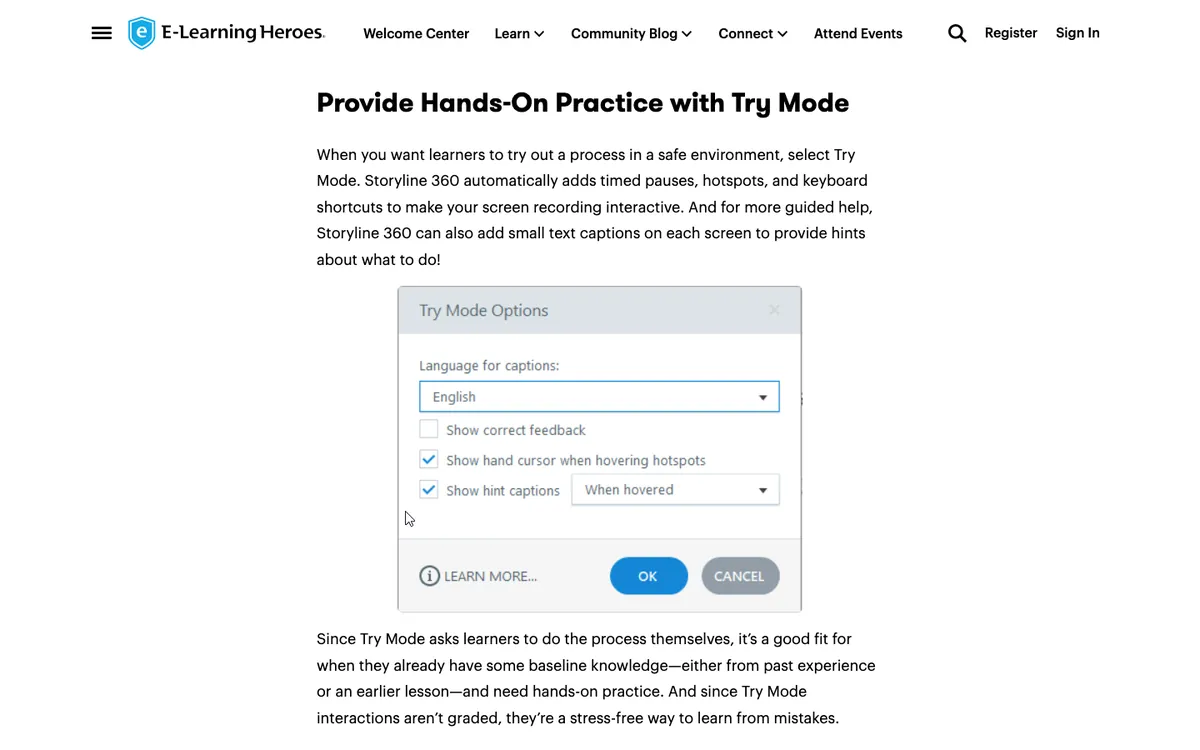
Recourse starts from whatever record of the task you have. Either click through the task in the real web app with the Chrome extension, which captures the screens, the clicks and the structure, or upload any recording: a Loom, a Zoom screen share, a recorded UAT or handover session, an old MP4. It generates a simulation with three modes: Demo (a guided walkthrough with narration), Practice (the learner does each step in a safe copy of the screens; if stuck, they get a hint, then a nudge, then the answer) and Evaluate (a scored assessment with a pass mark that reports to the LMS). A reviewer edits every step before it ships, and the simulation sits inside a course with course blocks, themes and AI editing.
Side by side
| Storyline 360 | Recourse | |
|---|---|---|
| Capture | Storyline's own screen recorder, inside the Windows desktop app, at the time you record | Chrome extension click-through, or any uploaded recording (Loom, Zoom, MP4) |
| Modes | View, Try, Test | Demo, Practice, Evaluate |
| How the modes are made | Automatically from Storyline's recording, then edited slide by slide | Generated from the recording, then edited per step |
| Hints during practice | Hint captions, optional | Escalating: a hint, a nudge, then the answer |
| Assessment | Test mode, graded, passing score, reported to the LMS | Evaluate, scored with a pass mark, reported to the LMS |
| Narration | Record a voiceover, import audio, or AI text-to-speech voices through AI Assistant | AI voice narration or your own recording |
| When the screen changes | Re-record in Storyline, re-insert, republish, re-upload | Re-capture the changed step and regenerate; on Team, live SCORM updates every LMS copy |
| Course around the sim | Storyline slides, or a Rise 360 course | Recourse course blocks; Rise import |
| Custom interactions | Triggers, variables and branching on a slide canvas | None |
| Runs on | Windows; on a Mac only through Parallels or VMware Fusion | Browser, any operating system |
| LMS output | SCORM 1.2, SCORM 2004, xAPI, cmi5, AICC | SCORM and xAPI; live SCORM on Team |
| Price | Articulate 360 AI, $1,749 per seat per year list | Free 30 days; Solo, Pro and Team on request |
Where Storyline is ahead
- Custom interactions. Storyline's triggers, variables and branching let you build almost any interaction on a slide canvas, around or inside a simulation. Recourse has no canvas and no equivalent.
- Templates and community. Articulate 360 AI includes 1,000+ templates and 20M+ media assets, and the E-Learning Heroes community has years of Storyline answers, examples and downloads.
- Standards breadth. Storyline publishes cmi5 and AICC as well as SCORM 1.2, SCORM 2004 and xAPI. Recourse publishes SCORM and xAPI.
- Review 360. Stakeholders comment in context on a published draft from a browser, with review requests and due dates, and they do not need an Articulate licence. Recourse has no threaded review tool.
Where Recourse is ahead
- Starts from a recording you already have. Storyline builds its steps only from a recording made in its own recorder, at the time you record. Recourse takes the Loom from the product team, the UAT session from the project, or a quick click-through in Chrome.
- Modes and narration generated, not assembled. Storyline also generates its three modes from a recording, and that saves real work. Recourse also structures the steps and adds narration, in an AI voice or your own, so the reviewer edits a draft rather than building one.
- Re-capture one step. When a screen changes, you re-capture the step that changed and regenerate. In Storyline, the step data lives in the recording, so the usual fix is a new recording, then republishing and re-uploading.
- Live SCORM. On Team, the package in the LMS points at the hosted course, so an edit reaches every LMS copy with no re-upload. Articulate's Connected Packages, which works the same way, is a Rise 360 publishing option; Storyline publishes a standard package.
- Browser and Mac. Storyline authoring needs Windows, or Windows in a virtual machine on a Mac. Recourse runs in the browser.
- Self-serve start. Recourse starts free for 30 days with full access, so you can build a simulation from one of your own recordings before talking to anyone.
What Recourse does not do
- No live-app overlay or in-app guidance. Simulations run in a safe copy of the recorded screens, not on top of the real software.
- No branching yet: each simulation follows one right path. Branching is on the roadmap.
- No LTI, cmi5 or AICC output, and no native LMS.
- No threaded review comments.
- Desktop applications only through an uploaded video; the Chrome extension captures web apps.
- It cannot import Storyline .story files.
If your simulations need branching or custom interactions around them, Storyline is the better tool for that work.
Pricing
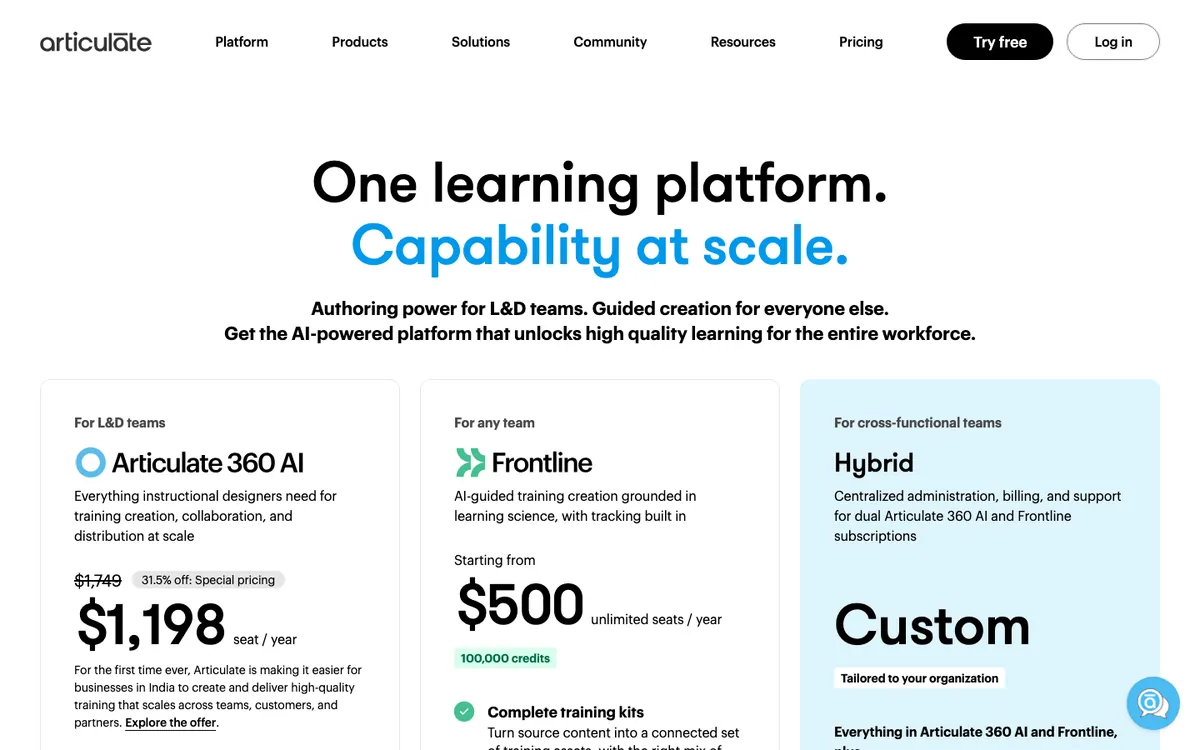
Storyline is sold as part of Articulate 360 AI, alongside Rise, Review and Reach, at $1,749 per seat per year on Articulate's pricing page. On the day we checked, the page also showed a regional offer at $1,198 for businesses in India. AI avatars and multi-format translation draw credits, from $250 per 50,000, which expire at the end of the term. Frontline, from $500 a year for unlimited seats, does not include Storyline or Rise. There is a 14-day free trial.
Recourse is free for 30 days with full access. Paid plans (Solo, Pro, Team): pricing on request, book a demo at /pricing. Solo is courses only, shared by a Recourse link, with no SCORM export. Pro adds simulations, the Chrome extension, static SCORM and xAPI. Team is three seats with unlimited simulations, live SCORM.
Frequently asked questions
Can Recourse replace Storyline for software simulations?
Can I import Storyline projects into Recourse?
Does Recourse do Try and Test modes like Storyline?
What happens when the software updates?
Does Storyline run on a Mac?
How do Storyline and Recourse prices compare?
How we checked
Storyline's facts were read from Articulate's own pages and its E-Learning Heroes community on 29 October 2026. Recourse's facts come from our pricing page and product. Spotted something out of date? Email hello@recoursehq.com.
- Storyline step-by-step slides: View, Try and Test mode
- Follow these 5 steps to record your screen in Storyline 360
- Software simulation using video not recorded through Storyline 360 (staff answer)
- Storyline 360 system requirements
- Storyline 360: publishing a course for LMS/LRS distribution
- Storyline 360: classic or AI-generated text-to-speech
- Articulate 360 pricing, Review 360, Connected Packages in Rise 360
- Recourse pricing and Recourse simulations
Related
Last checked 29 October 2026. Articulate's prices and features are taken from its public pages and can change.