Software simulations
iorad alternatives: 8 tools, and which ones let learners actually practise
iorad has been making interactive software tutorials since 2007, and its pitch is one capture, six modes. Most "alternatives" lists mix it in with documentation tools that produce something quite different. The useful distinction is what the learner does: read a guide, watch a video, or perform the steps and get told when they are wrong. This page sorts eight alternatives by that line, with prices and mechanics from each vendor's own pages.
Updated
Facts checked on 29 October 2026 against each vendor's own pages.
If you want step-by-step guides and videos for a knowledge base, Scribe, Tango or Guidde are cheaper and faster than iorad, but none of them validate the learner's clicks. If you need real practice with pass or fail, the options are Recourse, Adobe Captivate, dominKnow | ONE, Whatfix Mirror and Assima. iorad's own validated mode is Quiz; its Try mode is a guided click-through whose wrong-click behaviour the docs do not state.
What iorad does, and what it costs
You capture a process with a Chrome, Firefox or Edge extension, or a Mac or Windows app for desktop programs, and iorad generates six modes: Try, Scroll, Slide, Watch, Do and Quiz. Watch is a video, Scroll and Slide are reading formats, Do and Live Guidance overlay the steps on the real application, and Quiz is the one where learners "need to complete the correct action on screen in order to progress", with scoring. Try is described as a guided click-through with step prompts. Exports cover MP4, Word, Google Docs and Slides, PDF and, on Enterprise, HTML packages, SharePoint and SCORM 1.2 per mode.
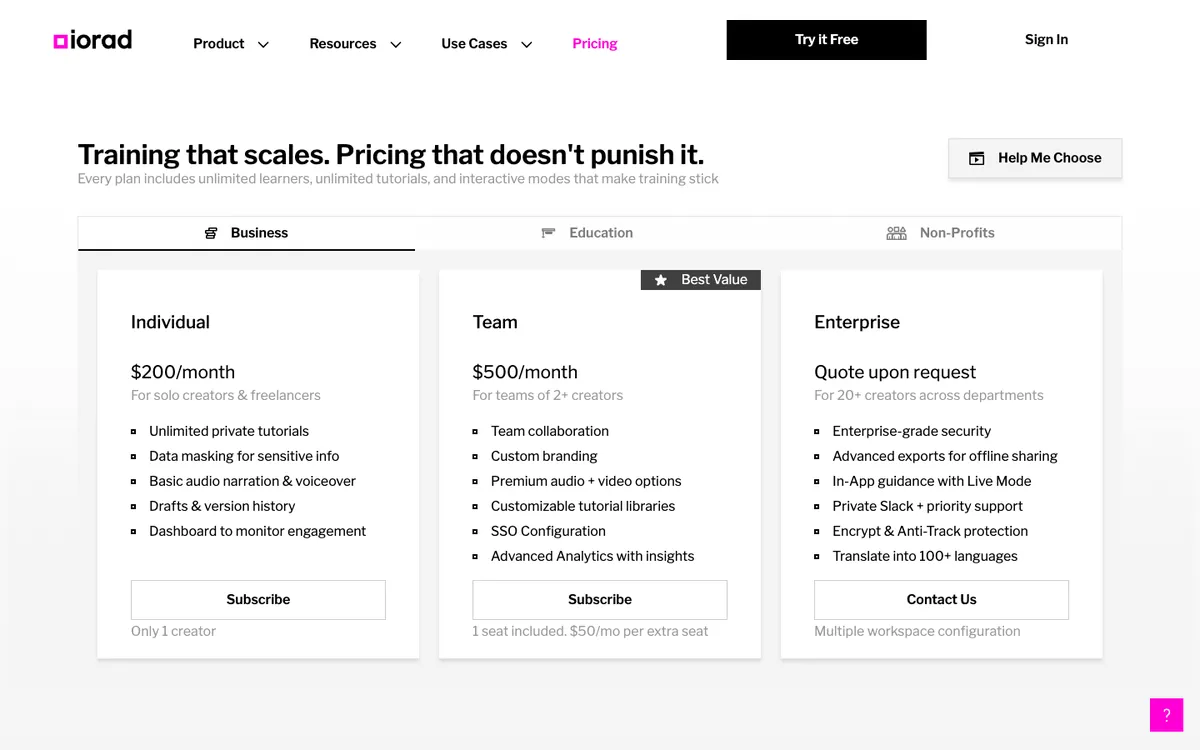
Pricing is per creator with unlimited learners: Free with no time limit (tutorials are public and indexable), Individual $200 a month, Team $500 a month with one seat included and $50 per extra seat, Enterprise on request. SSO is on Team; translation into 100+ languages, Live Mode and Advanced Exports are contact-sales items. The 2025 additions are AI "Storyteller" capture that edits from your narration (10 free uses) and an MCP connector. On Capterra it holds 4.7 from 59 reviews; reviewers like the support and dislike that steps cannot be reordered or two tutorials merged, and that pricing is "a little aggressive" for small businesses.
The eight alternatives at a glance
| Tool | Learner does | Capture | List price | SCORM |
|---|---|---|---|---|
| Scribe | Read, watch | Chrome or Edge extension; desktop app on Pro | Free; Pro $35 a month, or $17 per seat from 5 seats | Not mentioned |
| Recourse | Practise, assessed against a pass mark | Chrome extension or any uploaded recording | Free for 30 days; Solo, Pro and Team on request | SCORM and xAPI from Pro; live SCORM on Team |
| Tango | Read, guided overlay on the live app | Chrome or Edge extension; desktop app on Pro | Free; Pro $22 per user per month annual | Not mentioned |
| Guidde | Watch, read | Extension, desktop and mobile on Business | Free with watermark; Pro $19 per creator per month annual | SCORM 1.2 and 2004 on Enterprise, iframe-linked |
| Adobe Captivate | Practise, assessed | Desktop recorder | US$39.99 a month | SCORM 1.2 and 2004, AICC, xAPI |
| dominKnow | ONE | Practise, assessed | Capture, screenshot per step | Quote only, per author | SCORM 1.2 and 2004, AICC, cmi5, xAPI |
| Whatfix Mirror | Practise on a replica, scored | Replica of a web app | Flat fee plus user licences, demo only | SCORM 1.2 and 2004, enabled by Whatfix support |
| Assima Train | Practise on a cloned UI | Windows desktop launcher | Quote only, no trial | SCORM 1.2 and 2004, LTI |
Read or watch: documentation tools
1. Scribe
The biggest of the capture tools: a Chrome or Edge extension (and desktop apps on Pro and Enterprise) that turns clicks into a screenshot guide, plus AI-drafted Pages that embed those guides. Exports to PDF, HTML, Markdown and Word; sharing by link, embed or "share as video". Basic is free, Pro Personal is $35 a month for one seat and Pro Team $17 per seat from five seats, or $25 and $13 billed yearly, and Enterprise adds SSO, SCIM and on-demand translation into 110 languages. There is no try or test mode and no SCORM anywhere on scribe.com. The company raised $75 million in November 2025 at a $1.3 billion valuation and is pushing a workflow-intelligence product, Optimize. G2 rates it about 4.8 from several hundred reviews; the complaints are redaction, over-eager auto-blur and editing limits on the free plan.
2. Tango
Similar capture (Chrome or Edge, desktop on Pro) with one distinctive feature: Guide Me opens a side panel in the live web app and highlights where to click, advancing when the learner clicks the highlighted box. It only works on browser captures made with the extension, and the help centre does not say what happens on a wrong click, so treat it as guidance rather than assessment. Free allows five shared workflows and ten users; Pro is $22 per user per month annual for one or two users, $15 from three; Enterprise adds SSO, branching and translations in 10 languages. No SCORM or LTI appears in its sharing documentation. G2: 4.7 from about 500 reviews, with editing limits and Chrome dependence the recurring complaints.
3. Guidde
Video-first: the capture produces an AI-narrated video with captions plus a step document, translated into 50+ languages. Free carries a Guidde watermark; Pro is $29 a month or $19 annual per creator; Business $59 or $39; Enterprise adds SSO and SCORM 1.2 or 2004. The SCORM package wraps the Guidde player in an iframe, so edits propagate without re-upload, but the learner is still watching, not doing.
Practise: simulation tools
4. Recourse
Click through the task with the Recourse Chrome extension, which captures the screens, the clicks and the structure, or upload any recording (a Loom, a Zoom share, a recorded UAT session, an old MP4), and it generates a click-by-click simulation with Demo, Practice and Evaluate modes. In Practice a hint appears when the learner stalls, then a nudge, then the answer; Evaluate is a scored assessment with a pass mark that reports to the LMS. The simulation is wrapped in a structured course. Solo shares courses by Recourse link with no SCORM export; Pro adds simulations, the Chrome extension, and static SCORM and xAPI; Team is three seats with unlimited simulations, live SCORM. It is free for 30 days with full access and a watermark, and Solo, Pro and Team are priced on request. Compared with iorad, it does not overlay steps on the live application (no Do or Live mode) and has no public-tutorial free tier. See Recourse vs iorad.
5. Adobe Captivate
Records a procedure once and produces Demo (watch), Training (perform each step with hints and a failure caption on a wrong click) and Assessment (no hints, points per correct click, limited attempts). Self-contained SCORM 1.2 and 2004, AICC and xAPI. US$39.99 a month on Adobe's page. It is a desktop authoring tool with a learning curve, and edits mean re-publishing and re-uploading the package.
6. dominKnow | ONE
Capture takes a screenshot per step and generates Show me, Guide me, Try me, Practice and Test me, with multi-branching and multiple hotspots since Capture 2.0. Exports SCORM, xAPI, HTML5, MP4, PDF and GIF, and its Convey stub keeps LMS copies updated when you republish. Pricing is per author and quote-only. Best fit when you also build regular courses and want one platform.
7. Whatfix Mirror
Builds an interactive replica of a web application for sandbox practice and scored assessments, with AI role-play added in March 2026. Pricing is a flat fee plus per-user licences, demo only, and Mirror exports simulations as SCORM 1.2 or 2004 once Whatfix support switches it on. It is an enterprise purchase.
8. Assima Train
Assima's patented cloning captures the UI objects of the real application, not pixels, so you get an editable, fully interactive copy with See it, Try it and Do it modes, and localisation or data changes without re-recording. SCORM 1.2 and 2004 plus LTI 1.1 and 1.3, including "e-learning links" that connect back to the platform so LMS content stays current. Windows desktop launcher, SAP, Salesforce, Workday and Oracle named. Enterprise-only, demo-only, no trial; a UK reseller listing shows about £4,456 per licence per month. See the Assima alternatives page for detail.
How to choose
- Is the goal a document or a skill? Documentation tools win on speed and price. If someone must be able to do the task afterwards, you need validation, and only the simulation group provides it.
- Where will it live? Knowledge bases and intranets want embeds, which every tool here does. An LMS wants SCORM, which rules out Scribe and Tango and puts iorad and Guidde on their Enterprise tiers.
- How often does the app change? Assima's object capture and the hosted-package tools (Guidde, dominKnow, Recourse) handle updates without re-uploading. Captivate and iorad's static exports do not.
- Who pays and how? Per creator with free learners is standard; the spread is wide, from $19 a month to quote-only enterprise contracts.
What Recourse does not do
- No overlay on the live application and no in-app guidance.
- No branching yet: each simulation follows one right path. Branching is on the roadmap.
- No LTI, cmi5 or AICC output.
- No native LMS.
- No threaded review comments.
- Desktop applications only through an uploaded video.
If the job is guiding people inside the live app, iorad, Tango or a digital adoption platform is the better fit.
Frequently asked questions
How much does iorad cost?
Does iorad export SCORM?
Which iorad alternatives make the learner practise rather than read?
Is there a free iorad alternative?
How we checked
Every figure was read from the linked page on 29 October 2026. G2 and Capterra figures come from search results because both sites block automated requests. Corrections to hello@recoursehq.com.
- iorad pricing, learning modes, Advanced Exports, training deployment, leadership
- Scribe pricing and integrations
- Tango pricing, What is Guide Me, plan differences
- Guidde pricing and SCORM export
- Adobe Captivate and simulation modes
- dominKnow Capture and pricing
- Whatfix Mirror, Mirror SCORM export and pricing
- Assima FAQ and systems training platform
- Recourse pricing and simulations
Related
Last checked 29 October 2026. Prices and features are taken from public vendor pages and can change.