Software simulations
Recourse vs iorad
Both products start from the same act, recording someone doing a task, and both end with something interactive. The difference is what the interactive thing is for: iorad's strongest modes live on top of the real application; Recourse's live inside a course, as practice the learner completes before they touch the live system.
Updated
Facts checked on 29 October 2026 against each vendor's own pages.
Choose iorad if the job is helping people while they use the software, with tutorials and a Live Guidance overlay on the real app, and your learners are not in an LMS. Choose Recourse if the job is making people able to do the task before go-live, with practice and a scored assessment that report to the LMS and stay current there, and SCORM on a self-serve plan rather than at Enterprise.
What each one builds from a recording
iorad captures with a Chrome, Firefox or Edge extension or a Mac or Windows desktop app and generates six modes: Try (guided click-through with prompts), Scroll and Slide (reading), Watch (video), Do and Live Guidance (steps overlaid on the real application) and Quiz, the mode where the learner must "complete the correct action on screen in order to progress", with scoring. Exports include MP4, Word, Google Docs and Slides, PDF and, on Enterprise, HTML, SharePoint and SCORM 1.2 per mode.
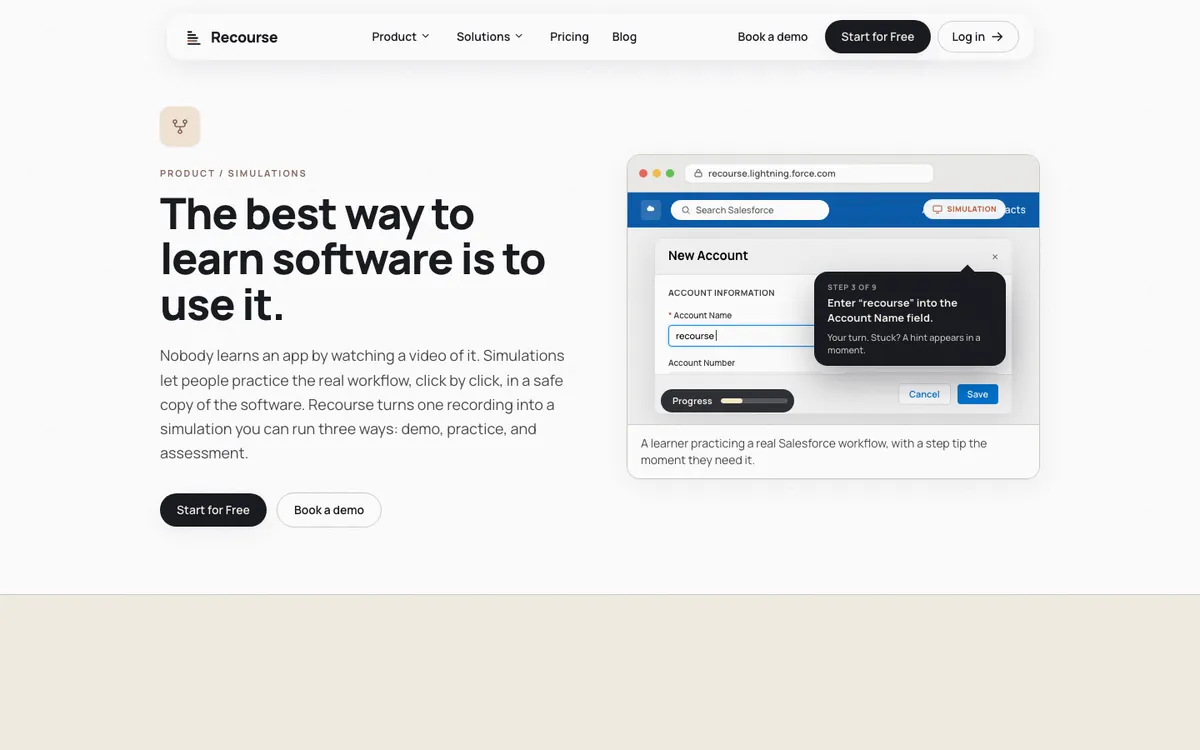
Recourse captures with its Chrome extension, which records the screens, the clicks and the structure as you click through the task in the real app, or takes any uploaded recording (a Loom, a Zoom share, a recorded UAT session, an old MP4). It generates a click-by-click simulation with three modes: Demo (a walkthrough that narrates itself), Practice (the learner performs each step in a safe copy of the screens; if they stall a hint appears, then a nudge, then the answer) and Evaluate (a scored assessment with a pass mark that reports to the LMS). The simulation is wrapped in a structured course with modules, objectives and checks for understanding, exported as SCORM or xAPI from the Pro plan.
Side by side
| iorad | Recourse | |
|---|---|---|
| Capture | Browser extension (Chrome, Firefox, Edge); Mac and Windows apps | Chrome extension; or upload any recording of any app |
| Modes | Try, Scroll, Slide, Watch, Do, Quiz | Demo, Practice, Evaluate |
| Validated practice | Quiz mode, scored | Practice (with hints) and Evaluate (scored, with a pass mark) |
| On the live application | Yes: Do mode and Live Guidance | No; sandbox only |
| Course authoring | No; tutorials and tutorial libraries | Yes, the simulation is wrapped in a course |
| LMS output | SCORM 1.2 per mode, Enterprise only | SCORM and xAPI from Pro; live SCORM on Team |
| Updates after an edit | Embeds update automatically; SCORM packages re-exported | Live SCORM updates every LMS copy; static packages re-exported |
| Translation | 100+ languages, contact sales | Multilingual output from one source |
| AI | Storyteller narration-driven editing; MCP connector | Simulation and course drafting from recordings; build from Claude or ChatGPT over MCP |
| Free tier | Free forever; tutorials public and indexable | 30 days, full access including the Chrome extension, watermark only |
| Price | $200 a month Individual; $500 Team plus $50 per seat; Enterprise quote | Free for 30 days with full access; Solo, Pro and Team: pricing on request |
| Track record | Since 2007, "30M+ learners" | New product |
Where iorad is clearly ahead
- Guidance in the real app. Do mode and Live Guidance put the steps on the live screen, GPS-style, with alternative paths. Recourse has nothing that runs on top of the real software.
- Breadth of formats. Six modes from one capture, plus Word, Google Docs, Slides and SharePoint exports, cover documentation needs that Recourse does not try to meet.
- Track record. iorad has been doing this since 2007 and claims 30 million learners. Recourse is new.
- Desktop capture. iorad records desktop programs live through its apps. Recourse covers desktop apps only through an uploaded video.
Where Recourse is ahead
- Training as the output. A recording becomes a simulation wrapped in a course, with learning design (objectives, checks) rather than a tutorial library.
- SCORM below Enterprise. iorad's SCORM 1.2 export sits behind Enterprise; Recourse exports SCORM and xAPI on its self-serve Pro plan, and Team adds live SCORM so an edit reaches every LMS without a re-upload.
- Hints instead of a wall. In Practice the learner is coached when stuck, which matters for the people a rollout is actually for. Evaluate then scores them against a pass mark and reports the result to the LMS.
- Self-serve start. The free 30 days include full access, the Chrome extension and SCORM export, so a team can test a simulation in its own LMS before talking to anyone.
What Recourse does not do
- No overlay on the live application and no in-app guidance.
- No branching yet: each simulation follows one right path. Branching is on the roadmap.
- No LTI, cmi5 or AICC output.
- No native LMS.
- No threaded review comments.
- Desktop applications only through an uploaded video.
If "guide people inside the app" is the job, iorad or a digital adoption platform is the better fit.
Pricing
iorad is priced per creator with unlimited learners: Free with no time limit (tutorials are public and indexable), Individual $200 a month, Team $500 a month with one seat included and $50 per extra seat, and Enterprise on request, which is where SCORM, HTML and SharePoint exports sit.
Recourse is free for 30 days with full access, Chrome extension included, with a watermark. Solo, Pro and Team: pricing on request. Solo is for courses shared by a Recourse link, with no SCORM export. Pro adds simulations, the Chrome extension, and static SCORM and xAPI. Team is three seats with unlimited simulations, live SCORM.
Frequently asked questions
What is the main difference between Recourse and iorad?
How do the prices compare?
Do both export SCORM?
Which one can guide someone inside the real application?
How we checked
iorad's facts were read from the linked pages on 29 October 2026. Recourse's facts come from our pricing page and product. Corrections to hello@recoursehq.com.
- iorad pricing, learning modes, features, Advanced Exports, leadership
- Recourse pricing and Recourse simulations
Related
Last checked 29 October 2026. iorad's prices and features are taken from its public pages and can change.